# Menggunaan zoom untuk join meeting

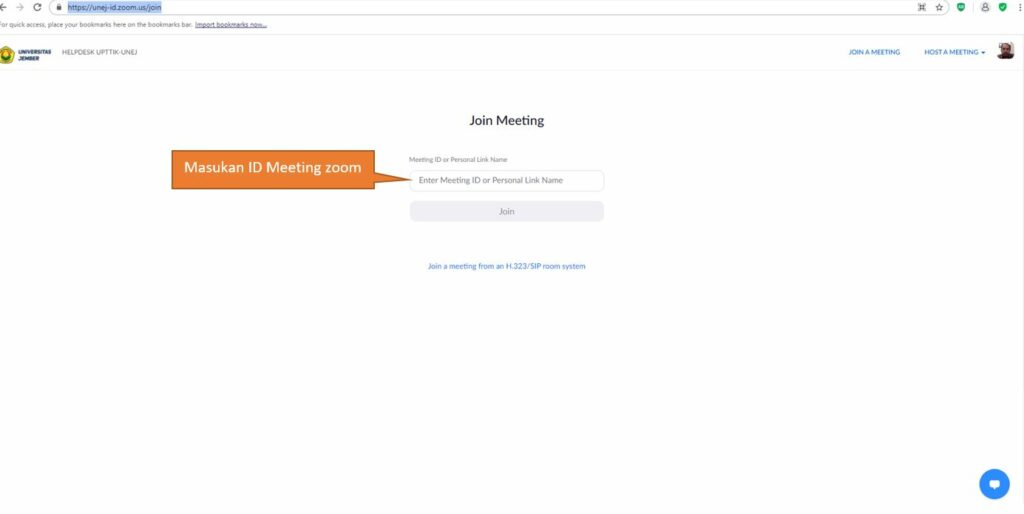
<span style="color: rgb(89, 89, 89); font-family: 'Work Sans'; font-size: 16px; font-style: normal; font-variant-ligatures: normal; font-variant-caps: normal; font-weight: 400; letter-spacing: normal; orphans: 2; text-align: start; text-indent: 0px; text-transform: none; white-space: normal; widows: 2; word-spacing: 0px; -webkit-text-stroke-width: 0px; background-color: rgb(255, 255, 255); text-decoration-thickness: initial; text-decoration-style: initial; text-decoration-color: initial; display: inline !important; float: none;">untuk mengikuti atau join meeting dengan klik </span>[<span style="box-sizing: border-box; background-color: rgb(255, 255, 255); color: rgb(0, 33, 71); text-decoration: none; margin-bottom: 0px; font-family: 'Work Sans'; font-size: 16px; font-style: normal; font-variant-ligatures: normal; font-variant-caps: normal; font-weight: 400; letter-spacing: normal; orphans: 2; text-align: start; text-indent: 0px; text-transform: none; white-space: normal; widows: 2; word-spacing: 0px; -webkit-text-stroke-width: 0px;">https://unej-id.zoom.us/join</span>](https://unej-id.zoom.us/join)

[![zoom2-1024x514.jpg](https://wiki.tik.unej.ac.id/uploads/images/gallery/2023-10/scaled-1680-/zoom2-1024x514.jpg)](https://wiki.tik.unej.ac.id/uploads/images/gallery/2023-10/zoom2-1024x514.jpg)